

Preview mode (Call agent first)
The queue first calls an agent (that gets screen-pop with information about the contact), and when the agent has answered, the queue calls the contact’s number. This results in the same events as with ordinary outgoing calls.
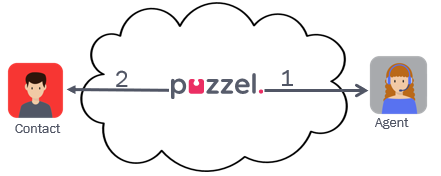
An answered call
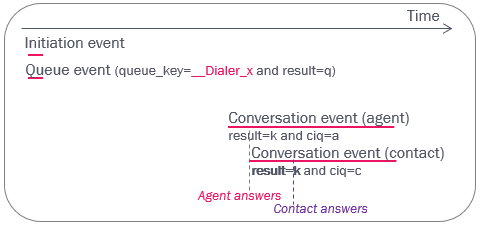
The queue event’s result will be q, and the queue_key will usually start with “__Dialer”.
Please note that the conversation events will appear in the db (much) later than the initiation event and the queue event (and with another internal_iq_session_id but the same call_id), since it may take several minutes (or even hours) from a list contact is put into queue until it is called.
If the agent that's offered a Preview Dialler call clicks Reject or does not answer, the call is sent to the next ready agent.
If the agent that's offered a Preview Dialler call clicks Cancel, the call stops and the Dialler contact is marked as 'disabled'. In Raw data the conversation event for the agent that got this call offered gets result = h (hang-up) and we generate a queue event with result = d (deleted). In Archive we show this Dialer call as deleted in queue.
An unanswered call
When the agent answers, the contact is called, but the contact does not answer.
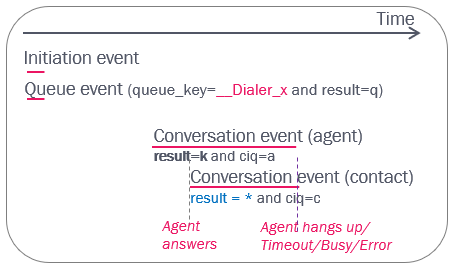
* The different no-answer scenarios (result in conversation event for call to contact) are:
| result_code | Description |
|---|---|
| t | alerting (ringing) timeout when calling contact |
| h | agent hangs up while the call to contact is in alerting phase |
| q | agent hangs up while call to contact is in set-up phase |
| b | the contact’s number is busy (or called contact clicks Busy/Reject) |
| c | call to contact times out during set-up phase |
| e | error in network or number not in use. (result_response = 1 or 404 usually means number not in use) |
If the Dialler call is answered, the agent can transfer the contact to another agent, to a phone number or to a queue. If the agent transfers to another agent, this new agent’s conversation event will also get ciq='a' since this is in the same 'ciq' session.