

Service variables
On page Services - Service variables you can change some variables in the Puzzel solution. The main purpose is to determine how a request is handled, either by assigning each variable a value from a drop-down menu, or by typing it yourself. What variables that are available is configured in collaboration with Puzzel support when the solution is first set-up.
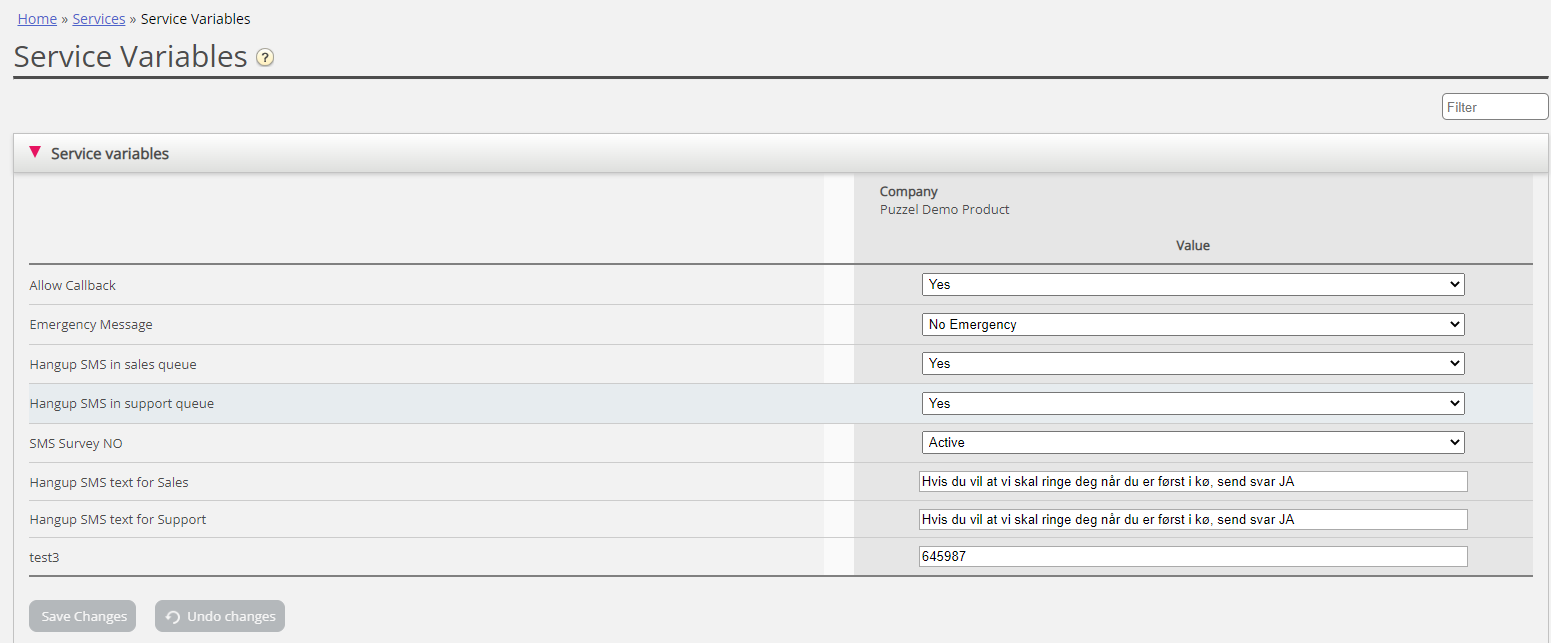
Among features that can be changed are:
- Opening hours
- Special voice message
- Route traffic
- Switch functions on/off
In the example above some service variables for different locations have been configured into the solution. In this case, if the Denmark office would not want to offer their callers call-back at the moment, this can be configured by choosing No from the drop-down menu and then Save Changes. Configuring a special variable can enhance the flexibility of your solution.
If you have lots of Service variables you can type some text in the Filter input box so that only rows where Name or Value matches the text are shown.
If not all users with access to page Services - Service variables should see all the service variables, you can create resource filters that include a selection of Service variables and assign them to different admin users.
Add Service variables
Certified Call Flow Tool users may on request be given access to accordion 'Add Service variables' on this page, so that they can create new and edit/delete existing service variables themselves.
If the Administration property 'Add Service variables' is ON for a user, this user will see accordion Add Services variables on this page:

In the Add Service variables accordion, the user can add new service variables (drop-down and string) and edit existing ones.
IMPORTANT!
If you want to add, delete or change the name for any Value selection or add/delete variables - it is important that you also make corresponding changes in the Call Flow Tool's associated cc-switch modules and manually update where relevant. Also, be sure to check and update related Call Flows that use the service variables or values in the solution’s logic. Remember to test that your solution works end-to-end where solution variables are involved. Don’t hesitate to contact Support before making changes here if you need tips and advice.