

Request Silent Monitoring
In the Request Silent Monitoring window, you must choose “listener”. The listener is usually you, but you can e.g. let an unexperienced agent listen in on an experienced agent’s call(s).
- If you want to listen, enter you own phone number or select My softphone
- If you are ordering Listen in on behalf of another user, please enter this other user’s (mobile) phone number or select the correct user group and then user name so that this person receives the listen in call on his/her Puzzel softphone.
Phone numbers (fixed or mobile) must include 00 and country code.
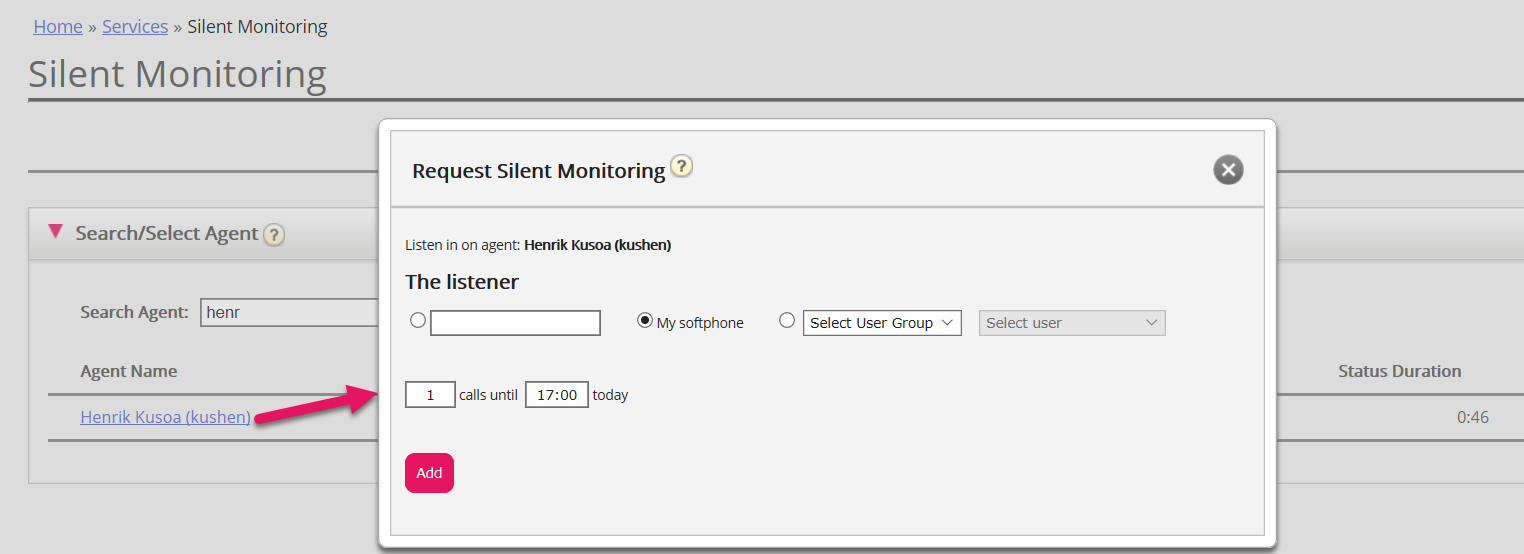
You then need to decide how many calls you want to listen to (default 1) and until what time. The reason you set a time limit is to avoid situations where Puzzel calls you/the listener when unavailable (e.g. in a meeting)
Once you have filled out the relevant information, click Add.
The listener receives a Silent monitoring call in Puzzel Agent application's Softphone
If the listener is your own Puzzel Softphone or another user's softphone, the listener’s Softphone (in Puzzel agent application) must be logged on to queue (with any profile containing Phone) to receive the listen in call. We recommend that the listener is in a (yellow) pause state (e.g. Admin) or is logged on with a (Back-office) profile not containing inbound queues while waiting for a listen in call.
When the listen in call arrives, the Puzzel softphone rings, but there will be no information telling which agent you will be listening to. Since we do not show a new call request tab in the right part of the agent application (as we do for ordinary calls from queue offered to agents) and you get the call even if you are in Pause, you will understand this is a Listen in call.

- If you are in a (yellow) Pause status when you answer a listen in call, your agent status will still be (yellow) Paused.
- If you are logged on and Ready (green) when you answer a listen in call, your agent status will still be Ready since this is not a call from a contact centre queue.